

Overview
Developing with APIs that charge per request requires careful testing strategies. This guide shows you how to build and test your Magic Hour integration effectively while minimizing costs and avoiding production issues.Testing Without Using Credits
Mock Server (Recommended for Development)
The Magic Hour SDKs include a mock server that returns realistic sample data without processing jobs or charging credits:style.tool is optional. It selects an art-style preset; ai-anime-generator requests an
anime look. Omit it to use the default general style.- ✅ No credit consumption
- ✅ Instant responses (no waiting)
- ✅ Realistic sample data
- ✅ Test error scenarios
- ✅ Validate integration logic
- Unit testing
- Integration testing
- Local development
- CI/CD pipelines
- Prototyping new features
Environment Configuration
Use environment variables to switch between mock and production:Error Handling Best Practices
Handling API Errors
Implement comprehensive error handling for all API calls:Handling Job Errors
Check for errors during job processing:Common Error Codes
Credits Not Charged: When a job fails with an error, you are never charged credits.
Status Monitoring Strategies
Polling with Smart Intervals
Adjust polling frequency based on content type:Implementing Timeouts
Always implement maximum wait times:Testing Strategies
Unit Testing
Test your integration logic without hitting the API:Integration Testing with Mock Server
Production Testing
Before going live, test with minimal credits:- Use Free Tier Credits: Test with daily free credits
- Small Test Jobs: Use minimum resolution/duration
- Single Job Tests: Test one job at a time initially
- Monitor Credits: Track credit usage during testing
Development Workflow
Recommended Development Process
Phase 1: Local Development- Use mock server exclusively
- Build integration logic
- Test error handling
- Test with real API using minimal credits
- Validate end-to-end workflow
- Test error scenarios
- Deploy with production credentials
- Monitor for errors
- Set up logging and alerts
Logging and Debugging
Implement comprehensive logging:Job Cancellation
Cancel video jobs to get full credit refunds (image jobs complete too quickly to cancel):1
Open project details
Visit the project in your library: - Videos:
https://magichour.ai/my-library?videoId= {project_id} - Images: https://magichour.ai/my-library?imageId={project_id} - Audio:
https://magichour.ai/my-library?audioId={project_id}2
Click cancel render
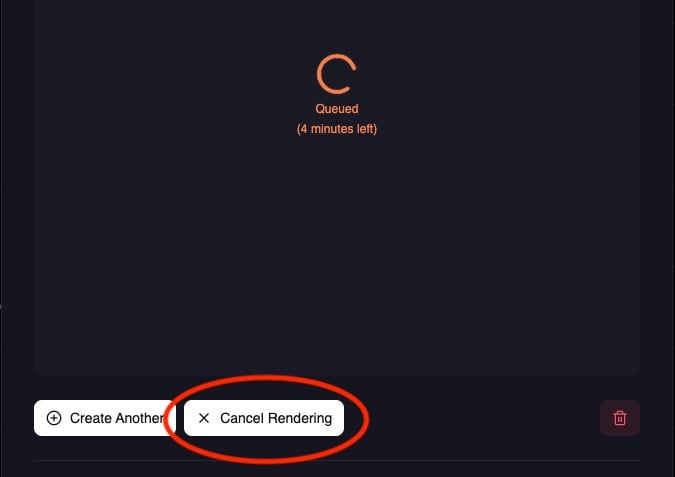
3
Confirm cancellation
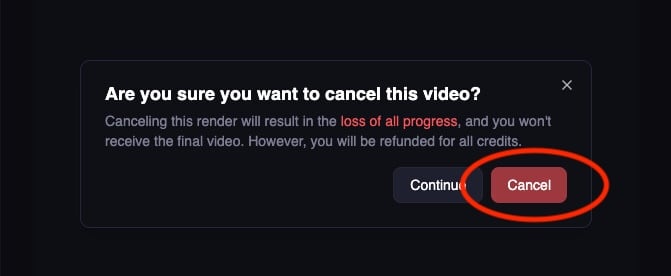
4
Cancellation complete
 Full credit refund is provided for cancelled video
jobs.
Full credit refund is provided for cancelled video
jobs.- Image jobs cannot be cancelled (they complete too quickly)
- API-based cancellation is not currently available
- Full credit refund is provided for cancelled video jobs
- Only works for jobs in
queuedorrenderingstatus
Production Deployment Checklist
Before deploying to production:Security
- ✅ API keys stored in environment variables (not hardcoded)
- ✅ API keys not committed to version control
- ✅ Different API keys for development/staging/production
- ✅ Webhook signatures verified (if using webhooks)
Error Handling
- ✅ All API calls wrapped in try/catch blocks
- ✅ Specific error codes handled appropriately
- ✅ Retry logic with exponential backoff
- ✅ Timeout handling for long-running jobs
- ✅ Logging for all errors
Monitoring
- ✅ Credit usage tracking
- ✅ Error rate monitoring
- ✅ Job completion time tracking
- ✅ Failed job alerting
- ✅ Download success/failure tracking
File Management
- ✅ Downloaded files stored in reliable storage
- ✅ Cleanup of old generated files
- ✅ Handling of download URL expiration
- ✅ Disk space monitoring
Performance
- ✅ Appropriate polling intervals implemented
- ✅ Concurrent job limits configured
- ✅ Rate limiting respected
- ✅ Connection pooling for multiple requests
Testing Checklist
Before deploying, verify:Basic Functionality
- ✅ Job creation succeeds
- ✅ Status polling works correctly
- ✅ File downloads successfully
- ✅ Multiple concurrent jobs handle correctly
Error Scenarios
- ✅ Invalid API key handling
- ✅ Insufficient credits handling
- ✅ Invalid parameters rejection
- ✅ Network errors and retries
- ✅ Timeout handling
Edge Cases
- ✅ Very large files
- ✅ Very small files
- ✅ Multiple output files
- ✅ Expired download URLs
- ✅ Job cancellation
Debugging Common Issues
Issue: Jobs Stay in “queued” Status
Possible causes:- High server load
- Invalid input files
- Account issues
- Wait longer (up to 5 minutes)
- Check input file validity
- Verify account has sufficient credits
- Contact support if persistent
Issue: Download URLs Return 404
Possible causes:- URLs expired (24+ hours old)
- Job was deleted
- Invalid job ID
- Request fresh URLs using GET endpoint
- Verify job ID is correct
- Download files within 24 hours of completion
Issue: High Credit Usage During Testing
Solutions:- Switch to mock server for development
- Use minimum resolution/duration for tests
- Implement proper cleanup of test jobs
- Monitor credit usage in Developer Hub
Next Steps
First Integration
Build your first integration from scratch
Inputs & Outputs
Advanced file handling techniques
Webhooks
Set up webhooks for production
API Reference
Complete endpoint documentation
Questions? Join our Discord community or email support@magichour.ai