

- Created a webhook endpoint in your application
- Registered it with Magic Hour
- Tested it with a real API call
- Verified webhook delivery works
What Are Webhooks?
Webhooks let you receive real-time notifications when your API requests complete, eliminating the need for polling. Instead of repeatedly checking job status, Magic Hour automatically notifies your application when jobs finish. Benefits:- ✅ Real-time notifications (no polling delays)
- ✅ Efficient resource usage (no constant polling)
- ✅ Better user experience (instant updates)
- ✅ Scalable for high-volume operations
Step 1: Create Your Webhook Endpoint
First, create a simple webhook handler that can receive and process events.Using Jupyter/Colab? See the “Colab/Jupyter” tab below for notebook-compatible code, or use
webhook.site for instant testing without any code.
Step 2: Make Your Endpoint Publicly Accessible
Your webhook endpoint needs to be accessible from the internet. Choose one of these options:- ngrok (Recommended)
- webhook.site (Quick Testing)
- Production Server
Perfect for local development and testingInstall ngrok:Start your server:Expose it publicly:Copy the HTTPS URL (e.g.,
https://abc123.ngrok.io)Step 3: Register Your Webhook with Magic Hour
1
Visit Developer Hub
Go to Magic Hour Developer Hub, and click Create Webhook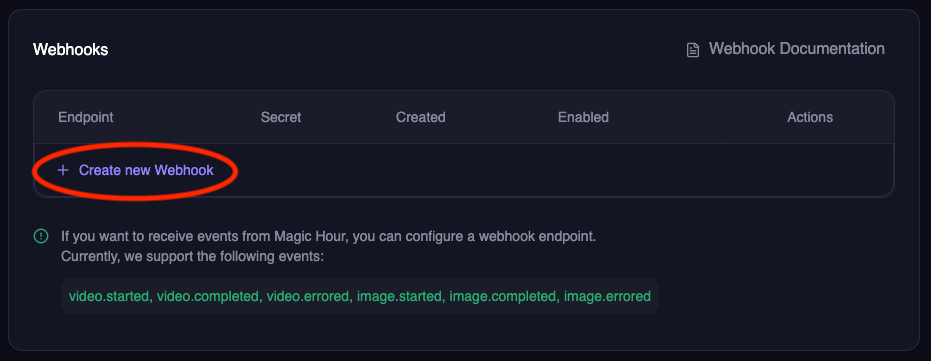
2
Configure webhook
Enter your webhook details:
- Endpoint URL: Your public HTTPS URL (e.g.,
https://abc123.ngrok.io/webhook) - Events: Select the events you want to receive:
-
video.started- When video processing begins -
video.completed- When video is ready for download -
video.errored- When video processing fails -
image.completed- When image is ready for download -
image.errored- When image processing fails -
audio.completed- When audio is ready for download -
audio.errored- When audio processing fails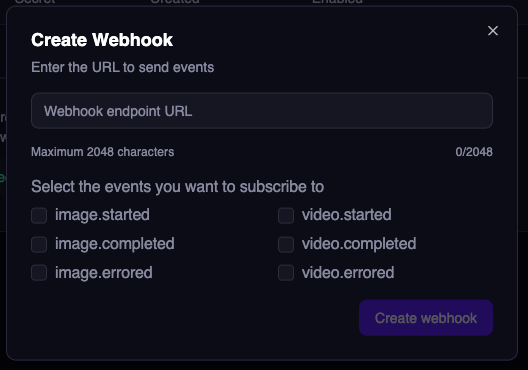
-
3
Save webhook secret
Important: Copy and save the webhook secret - you’ll need this for security verification later.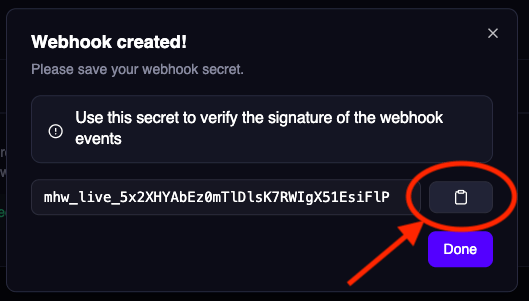
Step 4: Test Your Webhook End-to-End
Now let’s verify everything works by making a real API call and watching for the webhook.1
Start monitoring your webhook
If using your own server: Watch the console logsIf using Colab/Jupyter: Watch the cell output for webhook eventsIf using webhook.site: Keep the browser tab open to see incoming requests in real-time
2
Make a test API call
Create a simple image to trigger webhook events:
3
Verify webhook delivery
Within seconds, you should see webhook events in your console or webhook.site:Success! 🎉 Your webhook is working end-to-end.
Understanding Webhook Retries
If your endpoint doesn’t respond with a 2xx status code, Magic Hour will retry delivery:- Duration: Up to 24 hours
- Pattern: Exponential backoff (1s, 2s, 4s, 8s, …)
- After 24 hours: Event marked as failed, no more retries
Disabled Webhooks: If a webhook is disabled, pending events are skipped and marked as failed
after 24 hours.
Best Practices for Reliable Webhooks
✅ Do:- Return 2xx status codes within 10 seconds
- Process events asynchronously (respond fast, process later)
- Implement idempotent processing (handle duplicate events)
- Log all webhook events for debugging
- Perform long-running operations before responding
- Return non-2xx codes for successful receipt
- Assume events are delivered exactly once
- Block the response while processing
Production Webhook Handler
For production, implement robust error handling and background processing:Testing Locally
Before registering with Magic Hour, test your handler locally:Webhook Handler Requirements
Your webhook endpoint must:1. Accept POST Requests
2. Parse JSON Payload
3. Return 2xx Status Code
4. Respond Within 10 Seconds
Troubleshooting
Webhook not receiving events?- ✅ Check your endpoint URL is publicly accessible
- ✅ Ensure your server returns HTTP 2xx status codes
- ✅ Verify the webhook is enabled in Developer Hub
- ✅ Check server logs for errors
- ✅ Test with ngrok or webhook.site first
- ✅ Install required packages:
!pip install fastapi uvicorn nest-asyncio pyngrok - ✅ Make sure the server thread started successfully
- ✅ Check if ngrok tunnel is active and accessible
- ✅ Try webhook.site as an alternative for quick testing
- ✅ Use the Colab/Jupyter code version with
nest_asyncio.apply() - ✅ Don’t run
uvicorn.run()directly in notebooks - use the threading approach
Next Steps
Now that your webhook is working:Secure Your Webhook
Add signature verification to ensure webhooks are from Magic Hour
Event Types Reference
Learn about all available webhook events and their payloads
Webhook API Reference
Complete webhook API documentation
First Integration
Build a complete integration from scratch
Need help? Join our Discord community or email support@magichour.ai